X

Select Your Country

Turkey (Türkçe)Turkey (Türkçe) Worldwide (English)Worldwide (English)
X

Select Your Currency

Türk Lirası $ US Dollar

Nested Server

Nested Server, Dedicated virtual servers created in. It offers high performance and flexibility with virtualization at the operating system level, offered with different options.

  • Turkiye Location

    Our servers are hosted at the Datacasa Istanbul Tier III data center.

  • Free Migration

    Free migration support between compatible control panels.

  • Dedicated Resources

    All resources are exclusively allocated to you, not shared.

  • 24/7 Support

    Our experienced support team is available around the clock.

Nested Server

High Performance Nested Server

The packages listed below are specially prepared for you. You can review the packages that suit you best, or contact our Support Team for assistance with your selection.

  • Nested Server 1

    699,99 ₺

    / Monthly
    Add to Cart
    • İntel Xeon E5 2699 V4 10 CPU
    • 16 GB DDR4 RAM
    • 200 GB NVMe SSD
    • 100 Mbit/s Unlimited Traffic
    • VMware / Proxmox / Windows / Linux
    • Türkiye Location
  • Nested Server 2

    999,99 ₺

    / Monthly
    Add to Cart
    • İntel Xeon E5 2699 V4 12 CPU
    • 24 GB DDR4 RAM
    • 300 GB NVMe SSD
    • 100 Mbit/s Unlimited Traffic
    • VMware / Proxmox / Windows / Linux
    • Türkiye Location
  • Nested Server 3

    1.299,99 ₺

    / Monthly
    Add to Cart
    • İntel Xeon E5 2699 V4 16 Cpu
    • 32 GB DDR4 RAM
    • 400 GB NVMe SSD
    • 100 Mbit/s Unlimited Traffic
    • VMware / Proxmox / Windows / Linux
    • Türkiye Location

Step by Step Professional Results

Identify the services that suit your business needs, follow the guidance, and activate your infrastructure securely within minutes to kickstart your digital process.

01

Choose Your Domain Name

Select the most accurate and effective domain name for your project.

Search Domain
02

Service Selection

Choose your Hosting or Server infrastructure according to your requirements.

Select Service
03

Create an Account

Set up your secure account to manage your services.

Register
04

Make a Payment

Complete the secure payment process for your selected services.

Make Payment
05

Launch Your Project

Activate your system quickly by completing all the steps.

Client Panel

Key Features of Nested Server Packages

With exclusive benefits and advanced capabilities, we’ve carefully prepared our services on an optimized infrastructure built for maximum performance.

  • NVMe SSD Storage Architecture

    Outstanding storage performance powered by enterprise-grade NVMe SSD drives.

  • Windows & Linux Operating Systems

    Choose freely between Windows VDS or Linux VDS based on your needs.

  • Advanced Control Panel

    Manage your server in real time with console access.

  • Free Setup

    Your VDS server is installed free of charge by our technical team with the configuration and settings you request.

  • Enterprise Hardware Infrastructure

    High-performance Intel Xeon E5 CPU, Unity 300 All-Flash NVMe Storage, and 100% enterprise-grade servers.

  • Superior Virtual Dedicated Server

    Your resources are dedicated exclusively to you, ensuring top performance from your Nested server.

  • Free Website Migration

    Between compatible control panels, you can request a free migration handled by the teknosos.com.tr technical team.

  • 99% Uptime

    Speed and uptime are vital for every successful online store. Stay ahead with Teknosos!

  • 24/7 Technical Support

    Whenever you need help, Teknosos is here for you. We provide uninterrupted 24/7 support via our ticket system.

Selectable Operating Systems for Nested Server

Configure your Nested server to match your needs by choosing one of our optimized operating systems designed for performance, security, and flexibility.

  • Windows Windows
    • Windows 11
    • Windows 10
    • Windows 7
    • Windows Server 2025
    • Windows Server 2022
    • Windows Server 2019
    • Windows Server 2016
    • Windows Server 2012
  • CentOS CentOS
    • CentOS 8.5 Stream
    • CentOS 9.0 Stream
    • CentOS 7.9
    • CentOS 6.10
  • Ubuntu Ubuntu
    • Ubuntu 24.10
    • Ubuntu 24.04
    • Ubuntu 23.10
    • Ubuntu 22.04
    • Ubuntu 20.04
    • Ubuntu 18.04
    • Ubuntu 16.04
    • Ubuntu 14.04
  • Debian Debian
    • Debian 12.7
    • Debian 12.4
    • Debian 12.2
    • Debian 11.8
    • Debian 10.13
    • Debian 9.13
  • ESXi ESXi
    • VMware ESXi 8.0
    • VMware ESXi 7.0
    • VMware ESXi 6.7
    • VMware ESXi 6.5
    • VMware ESXi 6.0
  • Alma Linux Alma Linux
    • AlmaLinux 9.4
    • AlmaLinux 9.3
    • AlmaLinux 9.2
    • AlmaLinux 8.8
  • Rocky Linux Rocky Linux
    • Rocky Linux 9.4
    • Rocky Linux 9.3
    • Rocky Linux 9.2
    • Rocky Linux 8.8
  • FreeBSD FreeBSD
    • FreeBSD 14.1
    • FreeBSD 13.4
  • Fedora Fedora
    • Fedora Server 41
    • Fedora 39.1.5
    • Fedora 38.1.6
    • Fedora 37.1.7
  • Oracle Linux Oracle Linux
    • Oracle Linux 9.4
    • Oracle Linux 9.3
    • Oracle Linux 8.9
  • Proxmox Proxmox
    • Proxmox 8.2
    • Proxmox 8.1
  • Other Other Applications
    • Ruby (Ubuntu 22.04)
    • Rust Desk Server (Ubuntu 22.04)
    • Prometheus & Grafana
    • NodeJS & PM2
    • GO
    • OpenVPN

Selectable Control Panels for Nested Server

Managing your Nested server is now much easier with secure, fast, and user-friendly control panels. All popular panels can be installed with a single click.

  • Plesk Plesk Panel
  • Vesta Panel Vesta Panel
  • CloudPanel CloudPanel
  • Cyber Panel Cyber Panel
  • cPanel cPanel
  • aaPanel aaPanel
  • Pterodactyl Game Panel Pterodactyl Game Panel

  • GameAP Panel GameAP Panel
  • Control Web Panel Control Web Panel
  • ISP Config ISP Config
  • Puffer Game Panel Puffer Game Panel

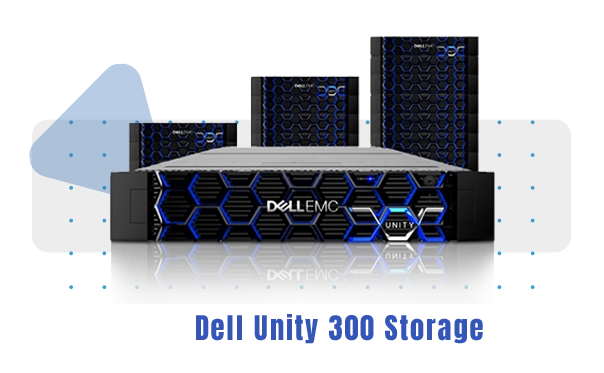
Dell EMC Unity 300 Storage Infrastructure for Nested Performance

Dell EMC Unity 300 Storage is an enterprise storage layer used in our Nested services to deliver high disk performance and stability. Since disk access speed and latency are critical for Nested performance, this architecture provides a smoother overall experience.

What is Dell EMC Unity 300 Storage?

Dell EMC Unity 300 is a reliable storage system used in data centers. With high IOPS and lower latency required in virtualization environments, it helps strengthen Nested disk performance.

Why is it Important in Nested Infrastructure?

In projects running on Nested, database queries, file read/write operations, and application processes depend directly on storage. With Unity 300, the goal is faster disk access, lower response times, and more stable operation.

Who is it Suitable For?

For e-commerce, corporate websites, database-heavy applications, and projects that require high I/O, a Nested infrastructure based on Dell EMC Unity 300 Storage delivers a performance advantage.

Dell EMC

What is a Nested Server?

Nested server is an infrastructure that allows you to run virtualization inside a virtual server. This enables you to install a hypervisor on a nested vds, create isolated virtual machines for test, lab, and development scenarios, and use a flexible nested virtual server setup.

What Does a Nested Virtual Server Do?

Nested virtual server is ideal for trying virtualization platforms, building training environments, and testing automation scenarios. You can run multiple VMs on a single nested server and isolate different operating systems and services securely.

Using Nested ESXi and Nested Proxmox

Nested ESXi or nested Proxmox lets you install ESXi/Proxmox inside a virtual machine to simulate virtualization management. This way, you can test vSwitch, storage, snapshots, and VM management in a nested vds environment with a near real-world approach.

Who is Nested VDS Suitable For?

Nested vds is suitable for software teams, DevOps workflows, system administrators, and users building training labs. Especially for CI/CD tests, experiments requiring isolation, and comparing different virtualization setups, a nested server helps you build an environment quickly.

What Should You Consider When Choosing a Nested Server?

When selecting a nested server, CPU virtualization support, sufficient RAM, NVMe disk performance, and network capacity are critical. Compatibility, resource isolation, and backup options for nested ESXi or nested Proxmox on a nested virtual server also directly impact your choice.

Virtual server

Instant Activation on Nested Servers

instant activation on nested servers means your nested server service is automatically provisioned and made ready within minutes after your order. Your resources are assigned, the baseline configuration is completed, and access details for your nested virtual server environment are generated quickly.

How Does Instant Activation Work?

The nested vds automation system verifies your selected package, operating system, and add-on settings, allocates resources on the virtualization layer, and brings your server online. This lets you start installing nested esxi or nested Proxmox on your nested server immediately.

Benefits of Instant Activation on Nested Servers

instant activation for a nested server enables a fast start, reduces downtime, and helps you launch your project immediately. For lab setups, test environments, training scenarios, and DevOps experiments, your nested virtual server infrastructure is ready without waiting.

When Can Instant Activation Be Delayed?

Activation on nested servers is usually completed automatically; however, brief delays may occur if additional verification, special network requests, a different location selection, stock checks, or security controls are required. In such cases, your nested vds provisioning continues with status updates.

First Steps After Instant Activation

After delivery of your nested virtual server, we recommend secure access, setting a strong password, firewall configuration, applying updates, and creating a backup plan. With proper setup, you can run your nested esxi or nested Proxmox environment more stably and perform virtualization tests securely.

Buy Virtual Server

Free Control Panels

free control panel options make server management more practical by providing a fast interface for essential needs. Support under this service is limited strictly to the options listed below.

Supported Free Control Panels

  • Cyber Panel
  • Vesta Panel
  • CentOS Web Panel

When Should You Choose One?

free control panels are commonly preferred for standard needs such as basic web hosting management, email accounts, domain operations, and service management. Choosing the right panel based on your project scale and use case simplifies server administration and speeds up operations.

Free Control Panels

What are the Advantages of a Nested Server?

nested server enables virtualization inside virtualization, delivering a fast and flexible infrastructure for test, lab, and development scenarios. With the right planning, you can use resources efficiently on a nested vds and build isolated, manageable systems in a nested virtual server environment.

Fast Setup and Instant Start

With a nested server, you can get access quickly and bring your virtualization environment online immediately. Especially for lab setups and PoC workflows, a nested virtual server saves time.

Realistic Test Environments with Nested ESXi and Nested Proxmox

nested esxi and nested Proxmox help you simulate real data center scenarios and safely test processes like vSwitch, storage, snapshots, and VM management. This approach speeds up learning and experimentation on a nested vds.

Isolation and a Safe Testing Area

nested virtual server helps you run isolated experiments in separate VMs. This allows you to test new configurations on a nested server without affecting production systems.

Flexible Scalability

On a nested vds, you can scale CPU, RAM, and disk resources as your needs grow, and optimize during lower-demand periods to control costs. This flexibility makes a nested server especially advantageous for project-based use.

Built for DevOps and Automation

nested server provides an ideal environment for CI/CD tests, automation trials, and multi-version scenarios. By building multi-VM setups inside a nested virtual server, you can run infrastructure tests in a more controlled way.

Efficient Infrastructure for Training and Lab Use

With nested esxi or nested Proxmox, you can create training labs and establish a consistent setup for internal team training. This makes it easy to build a repeatable, manageable training environment on a nested vds.

Virtual Server Advantages

Why is a Nested Server Better Than VDS/VPS and Classic Virtual Servers?

nested server goes beyond standard VDS/VPS and classic virtual server use cases by supporting nested virtualization. In lab, test, and training environments, you can run a hypervisor on a nested vds and create isolated VMs with a nested virtual server setup for more flexible infrastructure management.

Run a Hypervisor with Nested ESXi and Nested Proxmox

On standard virtual servers, you typically install an operating system and run applications. With nested esxi or nested Proxmox, you can install an additional virtualization layer and manage your own virtual machines. This gives you a realistic virtualization experience on a nested server.

Realistic Test & Lab Environments with Nested VDS

nested vds makes it easier to test vSwitch, storage, snapshots, VLAN, and VM lifecycle processes in a near real-world way. For training, PoC, DevOps experiments, and architecture validation, using a nested virtual server saves time and reduces risk.

Flexibility Beyond VDS/VPS and Classic Virtual Servers

On classic virtual servers, the infrastructure layer is closed; you use your resources, but hypervisor-level control is limited. A nested server expands your control by allowing you to install virtualization on top and compare different setups with nested esxi / nested Proxmox.

Isolation and Safe Testing with Nested Server

In a nested virtual server structure, each VM acts as a separate testing area. New configurations, updates, and service installations can be performed without impacting live systems. This makes trial-and-error much safer on a nested vds.

Who Should Choose a Nested Server?

nested server is ideal for anyone learning virtualization, building training labs, system administrators, software teams, and DevOps professionals testing different infrastructures. If you want multi-layer scenarios with nested esxi or nested Proxmox, a nested vds is a more flexible and efficient choice.

What Are the Differences Between VDS and VPS?

Turkey’s Most Advanced TIER III Data Center Infrastructure

Our services operate on infrastructure positioned to TIER III data center standards. With fully redundant power and fully redundant fiber infrastructure, service continuity is supported, while 24/7 secure access policies keep operational security at the highest level.

Fully Redundant Power and Fiber Infrastructure

The data center runs on its own fully redundant power infrastructure and fully redundant fiber infrastructure. This architecture reduces the risk of outages and supports high availability expectations for critical services.

2.4 Tbit Backbone Capacity

2.4 Tbit backbone capacity provides a strong network core for high-traffic projects. With a carrier-neutral data center structure offering Turkey’s largest network capacity, you can plan connectivity flexibly with multiple operator alternatives.

Juniper Series Network Equipment

Using Juniper series network equipment at the network layer targets low latency, stable routing, and high throughput. This helps keep network performance and service quality at an enterprise level.

24/7 Network Monitoring

Infrastructure is continuously tracked with 24/7 network monitoring. Traffic, link health, and anomalies are monitored to accelerate intervention processes, strengthening uptime and service continuity targets.

data center server hosting

Fast Solution Center

Frequently asked questions and actionable suggestions to help you progress within minutes.

A nested server is a virtual server running inside a physical server and has the ability to virtualize itself. That is, it allows you to create other virtual machines inside a virtual machine.

VPS uses shared resources and does not allow virtualization. Nested Server comes with dedicated resources and you can create virtual machines in it.

Yes, you can create your own virtual machines by installing the operating systems you want.

It offers the closest performance to a physical server and is more flexible than VDS.

Yes. You can add the backup service on the Nested server configuration page during ordering. After purchasing, your Nested server will be backed up daily and your data loss will be minimized in case of any possible problems.

Turkey's Largest Network and Operator Independent Data Center with 2.4 Tbit Backbone Capacity. We serve you with Juniper series network devices and 8 X 10Gbps Fiber Switch Backbone.

VDS is the virtual server closest to the physical server, but other virtual machines cannot be run in it. Nested Server allows virtualization.

It is ideal for those who want to do virtualization, those who set up test environments, and those with development projects.

You can use virtualization solutions such as KVM, VMware ESXi, Proxmox / Windows / Linux.

You can automatically install and manage it from your customer panel.

The provided Port is 1 GBit/s for economic packages and 10 GBit/s for Premium packages, and this speed is allowed for instant or short-term use. A limit is applied to your service by automation within continuity. Unlimited Traffic offered in current packages is limited to 100 Mbps, you can use 100 Mbps 24/7. If the line capacity is insufficient, you can purchase an additional line. You need to rent an additional line for your continuous use needs. You can order the line capacity you need during the order.

IP Whois registration is made for minimum /24 IP addresses, and RDNS registration can be made for every received subnet block.