 Turkey (Türkçe)
 Worldwide (English)
Activating and deactivating Cpanel GZIP plugin
Activating and deactivating Cpanel GZIP plugin

To enable or disable GZIP via Cpanel, you can activate the plugin by following the images below.
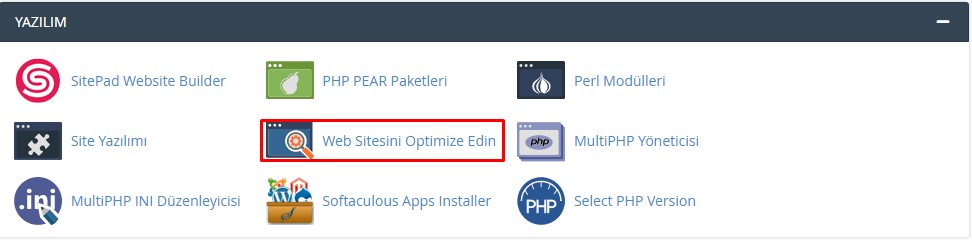
Go to the Cpanel home page and click on the Optimize Website button.
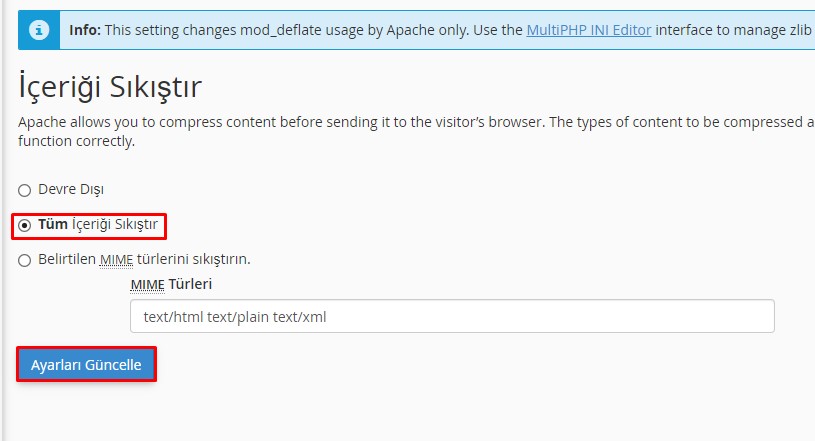
Select the Compress All Content option or Specified MIME types and activate it with the Update Settings button.
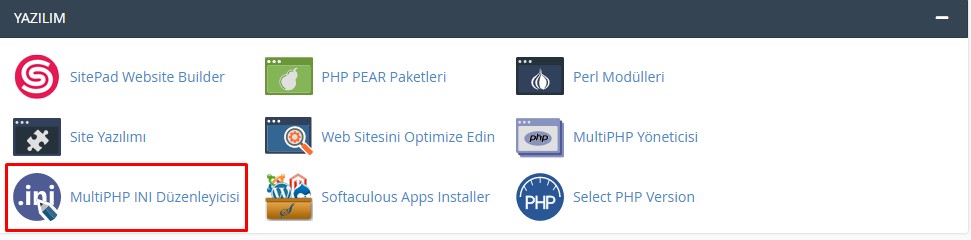
If you are using PHP, click on the MultiPHP INI Editor button again on the home page.
Activate the zlib.output_compression option at the bottom of the page.

Can't find the information you're looking for?
You have examined the knowledge base in detail, but if you cannot find the information you need,
Create a Support Ticket-
How to Open Ports in Windows?
445 2
-
How to Grant Windows Administrator Privileges?
358 0
-
How to install Webmin on Ubuntu?
991 2
-
Linux SSH Terminal Commands and Explanations
940 3
-
CentOS Stream 10 Update Commands
1007 1
-
CentOS Stream 9 Update Commands
1555 2
-
CentOS Stream 8 Update Commands
771 0
-
What is FreeBSD?
966 2
-
Out: 452 4.3.1 Insufficient system storage
861 2
-
Turning Off Automatic Updates in Windows Operating Systems
997 1
