 Turkey (Türkçe)
 Worldwide (English)
How to expand disk in Windows
How to expand disk in Windows

If you have storage space that is not defined on your disk in the Windows operating system, you can follow the steps below to define it on your disk.
1- We right click on the Windows icon at the bottom left.
2- We select Disk Management from the options that appear.
3- We click on the Extend Volume option as shown below.
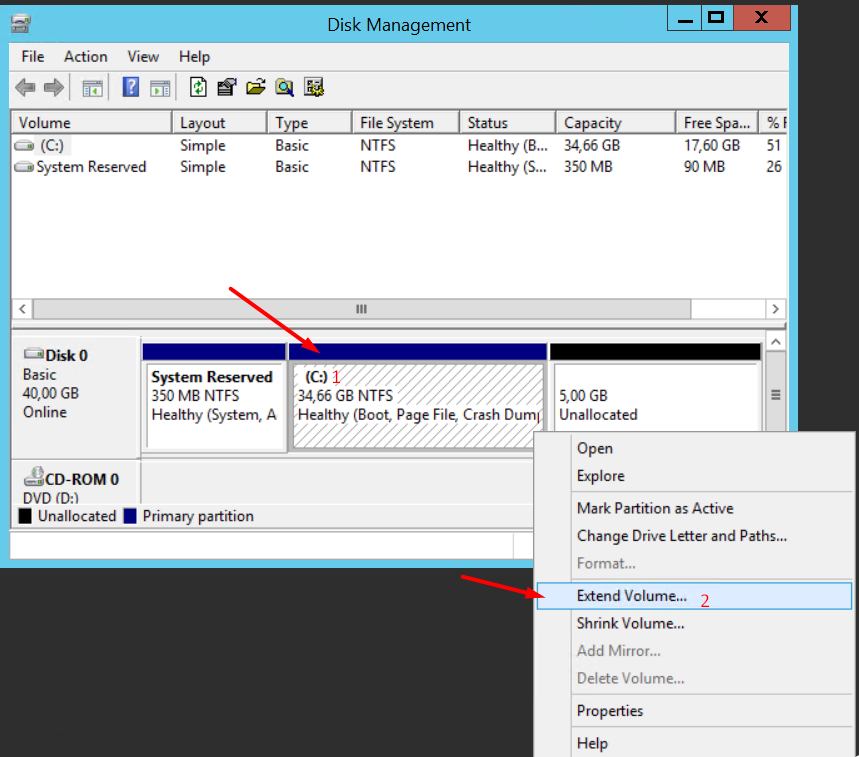
4- Then, on the screen that appears, click on the next buttons without changing any settings and the process will be completed with the finish button.
Can't find the information you're looking for?
You have examined the knowledge base in detail, but if you cannot find the information you need,
Create a Support Ticket-
How to Open Ports in Windows?
1309 2
-
How to Grant Windows Administrator Privileges?
867 0
-
How to install Webmin on Ubuntu?
1455 2
-
Linux SSH Terminal Commands and Explanations
1368 3
-
CentOS Stream 10 Update Commands
1405 1
-
CentOS Stream 9 Update Commands
2238 2
-
CentOS Stream 8 Update Commands
1239 0
-
What is FreeBSD?
1341 2
-
Out: 452 4.3.1 Insufficient system storage
1354 2
-
Turning Off Automatic Updates in Windows Operating Systems
1509 1
