 Turkey (Türkçe)
 Worldwide (English)
How to Change Plesk Panel Port

As with most web panels, you may be subjected to brute force attempts on the Plesk panel. For your security, you can change the Plesk panel default port by following the steps below. In this way, you will have a more reliable Plesk server. The following explanation is valid for Plesk Panel built on Linux.
We connect to our server via SSH and run the following command.
nano /etc/sw-cp-server/conf.d/plesk.conf
We open our Plesk settings file with the command we wrote above and replace the 8880 and 8443 Plesk panel input ports with the ports we want.
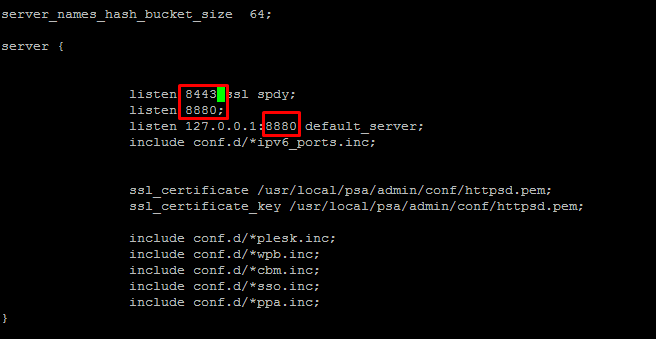
After the update is complete, save the file by pressing ctrl + x. Then reboot the server with the reboot command;
If you cannot log in to the Plesk panel with the port you updated, open the port numbers via iptables according to the example below;
iptables -I INPUT -p tcp –dport portnumber -j ACCEPT
iptables -I INPUT -p udp–dport portnumber -j ACCEPT
Can't find the information you're looking for?
You have examined the knowledge base in detail, but if you cannot find the information you need,
Create a Support Ticket-
How to Open Ports in Windows?
473 2
-
How to Grant Windows Administrator Privileges?
377 0
-
How to install Webmin on Ubuntu?
1007 2
-
Linux SSH Terminal Commands and Explanations
990 3
-
CentOS Stream 10 Update Commands
1039 1
-
CentOS Stream 9 Update Commands
1602 2
-
CentOS Stream 8 Update Commands
799 0
-
What is FreeBSD?
987 2
-
Out: 452 4.3.1 Insufficient system storage
908 2
-
Turning Off Automatic Updates in Windows Operating Systems
1037 1
