 Turkey (Türkçe)
 Worldwide (English)

In this article, we will show you the Centos 7 Disk Expansion process.
1-First, we connect to our server. After connecting, we find out how much space we have on our disk by typing the df -h code.
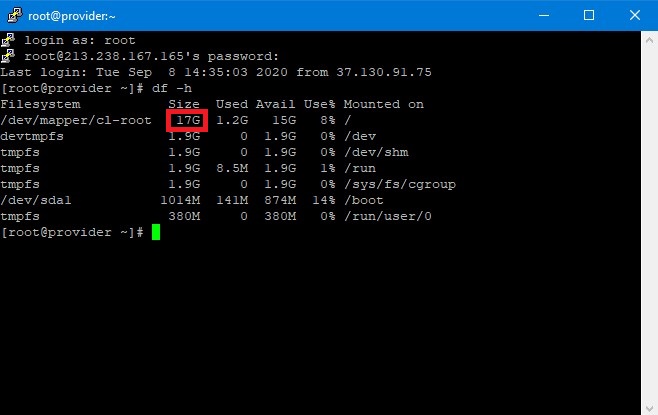
2-As you can see in the screenshot above, we have 17GB of Storage space. Copy and paste ALL the codes we give below.
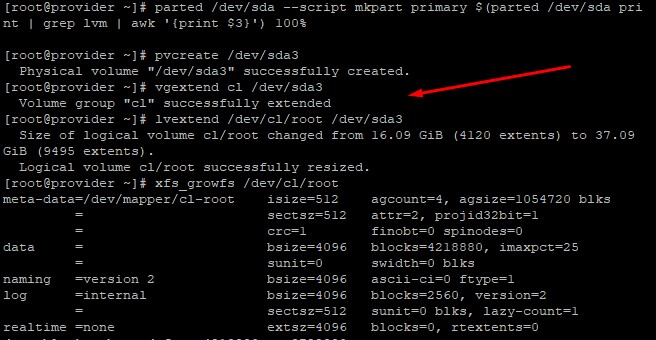
parted /dev/sda --script mkpart primary $(parted /dev/sda print | grep lvm | awk '{print $3}') 100%
pvcreate /dev/sda3
vgextend cl /dev/sda3
lvextend /dev/cl/root /dev/sda3
xfs_growfs /dev/cl/root
Copy and paste all the codes above.
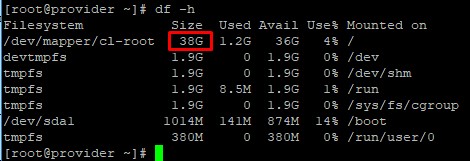
As you can see, the disk capacity increased from 17 to 38. Thanks to these codes, we have easily expanded our disk.
Can't find the information you're looking for?
You have examined the knowledge base in detail, but if you cannot find the information you need,
Create a Support Ticket-
How to Open Ports in Windows?
444 2
-
How to Grant Windows Administrator Privileges?
358 0
-
How to install Webmin on Ubuntu?
991 2
-
Linux SSH Terminal Commands and Explanations
940 3
-
CentOS Stream 10 Update Commands
1005 1
-
CentOS Stream 9 Update Commands
1553 2
-
CentOS Stream 8 Update Commands
770 0
-
What is FreeBSD?
965 2
-
Out: 452 4.3.1 Insufficient system storage
860 2
-
Turning Off Automatic Updates in Windows Operating Systems
991 1
