X

Select Your Country

Turkey (Türkçe)Turkey (Türkçe) Worldwide (English)Worldwide (English)
X

Select Your Currency

Türk Lirası $ US Dollar

Turkey Location Linux Reseller

With Reseller Hosting, provide full-fledged performance web hosting services at affordable prices, without limits.

  • Free Website Migration

    Your website will be securely and free of charge migrated from cPanel to cPanel by our team.

  • Free SSL Certificate

    A secure SSL certificate is provided for your website completely free of charge.

  • Free Automated Backups

    Your data is automatically backed up on a regular schedule and safely stored.

  • 24/7 Expert Support

    Our experienced support team is available 24/7 to assist you whenever you need.

Turkey Location Linux Reseller

High Performance Turkey Location Linux Reseller

The packages listed below have been specially designed for you. You can review the plans that best suit your needs and contact our Support Team for assistance with your selection.

  • Popular

    Economic Silver TR

    $13.06

    / Monthly
    Add to Cart
    • AI Support
    • Unlimited NVMe SSD Web Space
    • Unlimited Traffic
    • %200 CPU Kullanımı
    • 40 Site Hosting
    • Unlimited MySQL Databases
    • Unlimited E-Posta
    • %98 Inbox Guaranteed Mail
    • IO Value/ 10MB/s
    • 2 Core CPU
    • 2 GB Ram
    • Unlimited Subdomain
    • Unlimited FTP Account
    • The inode limit for each site is 250,000
    • Multi PHP
    • Php Selector
    • PHP 5.3-8.5
    • Anti DDos Protection
    • Automatic Shell Cleaning
    • Imunify360
    • Free Backup
    • CageFS
    • Design Your Website with SitePad
    • Free Backup
    • Turkey Location
  • Economic Gold TR

    $15.24

    / Monthly
    Add to Cart
    • AI Support
    • Unlimited NVMe SSD Web Space
    • Unlimited Traffic
    • %200 CPU Kullanımı
    • 60 Site Hosting
    • Unlimited MySQL Databases
    • Unlimited E-Posta
    • %98 Inbox Guaranteed Mail
    • IO Value/ 15MB/s
    • 2 Core CPU
    • 2 GB Ram
    • Unlimited Subdomain
    • Unlimited FTP Account
    • The inode limit for each site is 250,000
    • Multi PHP
    • Php Selector
    • PHP 5.3-8.3
    • Anti DDos Protection
    • Automatic Shell Cleaning
    • Imunify360
    • Free Backup
    • CageFS
    • Design Your Website with SitePad
    • Free Backup
    • Turkey Location
  • Economic Platinum TR

    $17.42

    / Monthly
    Add to Cart
    • AI Support
    • Unlimited NVMe SSD Web Space
    • Unlimited Traffic
    • %200 CPU Kullanımı
    • 100 Site Hosting
    • Unlimited MySQL Databases
    • Unlimited E-Posta
    • %98 Inbox Guaranteed Mail
    • IO Value/ 20MB/s
    • 2 Core CPU
    • 2 GB Ram
    • Unlimited Subdomain
    • Unlimited FTP Account
    • The inode limit for each site is 250,000
    • Multi PHP
    • Php Selector
    • PHP 5.3-8.5
    • Anti DDos Protection
    • Automatic Shell Cleaning
    • Imunify360
    • Free Backup
    • CageFS
    • Design Your Website with SitePad
    • Free Backup
    • Turkey Location

Step by Step Professional Results

Identify the services that suit your business needs, follow the guidance, and activate your infrastructure securely within minutes to kickstart your digital process.

01

Choose Your Domain Name

Select the most accurate and effective domain name for your project.

Search Domain
02

Service Selection

Choose your Hosting or Server infrastructure according to your requirements.

Select Service
03

Create an Account

Set up your secure account to manage your services.

Register
04

Make a Payment

Complete the secure payment process for your selected services.

Make Payment
05

Launch Your Project

Activate your system quickly by completing all the steps.

Client Panel
New Feature in cPanel

Create Your Professional Website Quickly, Easily and Modernly with Artificial Intelligence

With the advanced Sitejet Builder AI infrastructure included in all your hosting packages, you can create a professional, mobile-friendly website tailored to your business without needing any design or coding knowledge. Ready-made designs, AI-powered content generation, blog and social media tools, stock images, SEO settings, multilingual support, and form features all come together in a single panel.

AI-powered website builder
Publish Instantly Ready in a short time
AI Content Text and layout support
100% Free Included with your hosting
Hundreds of Ready-Made Designs Corporate, blog, service and promotion-focused options
Stock Image Gallery Quick access to visuals that enrich your pages
Blog and Social Media Create content, share it, and grow your reach
SEO and Multilingual Support Be more visible and reach different audiences more easily

All the Essential Tools You Need to Build Your Website in One Structure

From content creation to design, and from visibility to communication management, the main components you need come together on a single platform. This allows you to prepare your website in a more controlled and organized way without searching for additional tools.

AI-Powered Start

By defining your business and service area, you can begin the content creation process more quickly and build the basic page structure in a short time.

Ready-Made Design Options

With modern and corporate-looking templates, you can quickly create the first version of your website and customize it to match your brand.

Free Image Library

You can access visuals you can use on your pages and content more quickly and in a more organized way.

Blog Infrastructure

By creating blog posts and announcements, you can keep your site regularly updated and build a more active structure for your visitors.

Social Media Support

You can gain greater visibility by supporting your content with social links and sharing areas.

Multilingual Support

By creating different language versions, you can present your products and services to wider audiences in a more organized way.

SEO Tools

By adjusting titles, descriptions, link structure, and basic page settings, you can build a stronger infrastructure for search engines.

Form Creation and Communication

By adding contact, quote, reservation, and similar forms, you can collect visitor requests in a more organized way.

Mobile-Friendly Structure

By achieving a balanced appearance across desktop, tablet, and mobile screens, you can offer your visitors a more comfortable experience.

How Does the Process Progress from Setup to Launch?

You can start building and publishing your site in just a few organized steps, without dealing with complex processes.

01

Activate Your Package

Access the tools offered with your hosting service through your panel and start the website creation process.

02

Define Your Design

Choose the structure that suits your business and content, then shape the colors and page layout according to your brand.

03

Create Your Content

Create page titles, descriptions, and core text with AI support, then edit them according to your needs.

04

Enhance with Additional Features

Complete your site with blog sections, visuals, social links, forms, multilingual structure, and SEO settings.

05

Review and Publish

Make your final checks with the preview, then publish your website and start your digital visibility.

Easy Management from a Single Panel

Since page edits, content updates, visual changes, and basic configurations can all be handled from one screen, the process becomes simpler. Keeping your website updated and adding new content becomes much more practical.

Corporate Appearance, Controlled Start

It offers a structured and trustworthy starting point for businesses that want to build a new website or refresh their current appearance. With professional-looking templates and a modern structure, you can create a strong digital showcase for your brand.

Infrastructure Focused on Visibility and Access

Thanks to SEO settings, mobile compatibility, blog content, and multilingual options, you do more than just build a website — you gain a structure that makes it easier for potential customers to reach you.

Included in All Hosting Packages

This feature is not limited to a specific product group; it is offered as an integrated advantage that adds value to all your hosting packages. This allows you to start building your website directly from your hosting account without searching for additional software.

Web Hosting Package Highlights

With the advantages and advanced features we provide, we’ve carefully prepared our services on an optimized infrastructure built for maximum performance.

  • Free SSL

    Optimize your PHP-based projects with LiteSpeed technology and deliver an exceptional user experience with up to 400% speed improvements.

  • Free Website Migration

    Migrating your website from your previous server to our infrastructure can be time-consuming. Our technical team transfers your site free of charge and without disruption.

  • Free Backups

    Our servers are backed up weekly. In case of data loss, your website can be restored using the most recent backup created within the last 1–7 days.

  • Turkish Control Panel

    Your hosting service is easy to manage with cPanel, a trusted and globally recognized control panel.

  • WordPress LS Cache

    With the WordPress LS Cache plugin we provide at no extra cost, websites load up to 3x faster.

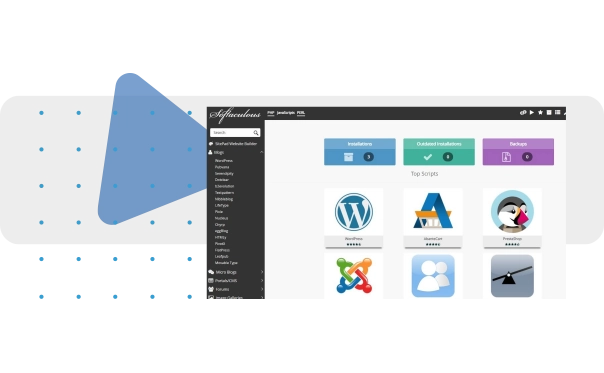
  • Softaculous -SitePad

    500+ professional themes and one-click installation for themes and scripts for your business.

  • E5 V4 Series CPU & DDR4 RAM

    With high-performance, up-to-date hardware, your websites are ensured to run continuously, fast, and efficiently.

  • 99% Uptime

    Speed and uptime are essential for every successful online store. Stay one step ahead with a reliable infrastructure.

  • 24/7 Technical Support

    Whenever you need help, our team is here for you. We provide uninterrupted 24/7 support through our ticket system.

Hundreds of Popular Apps Ready in One Click

WordPress, Joomla, OpenCart, Magento, and many more are just one click away. Build your blog, online store, or corporate website in minutes and go live. No technical knowledge required—everything is automatically configured.


What Is Web Hosting?

Web hosting is a server hosting service that enables a website to publish all of its files and data online. When visitors type your domain into a browser, your content is delivered from the server and displayed on screen. For this reason, hosting is the core infrastructure that supports your website’s speed, security, and uninterrupted availability.

What Does Web Hosting Do?

A reliable hosting infrastructure keeps your website accessible 24/7 and helps pages load quickly. In this process, the uptime rate is a key metric that indicates how consistently the server stays online. Strong hosting provides high performance, stable resource management, and secure data transfer, directly improving both user experience and SEO results.

Types of Hosting

  • Shared Hosting: A cost-effective option where resources are shared across multiple websites, ideal for starter sites and corporate landing pages.
  • VPS Hosting: A virtual server solution for projects that need more control and dedicated resources.
  • Dedicated Server: A high-performance option where all server resources are allocated to a single customer, preferred for high traffic and custom requirements.
  • WordPress Hosting: Hosting optimized for WordPress sites with a focus on speed and security.

Why Web Hosting Matters for SEO

Search engines prioritize websites that deliver a strong user experience. That’s why site speed and availability are critical for SEO. Performance factors such as SSD/NVMe storage, modern web server software (e.g., LiteSpeed), high uptime, and low response time help pages load faster and support longer on-site engagement. Security layers such as an SSL certificate, DDoS protection, and regular backups also strengthen your website’s reliability.

What to Consider When Choosing Hosting

When selecting a web hosting package, prioritize server performance, an uptime guarantee, SSD/NVMe infrastructure, traffic limits, 24/7 technical support, and security features. As your project grows, a smooth upgrade path to VPS or a dedicated server is a valuable long-term advantage.

Web Hosting

What Is Linux Hosting?

Linux hosting is a web hosting service where websites are hosted on servers running the Linux operating system. It’s widely preferred thanks to strong compatibility with PHP-based projects and popular platforms such as WordPress, Joomla, and Laravel.

What Does Linux Hosting Do?

Linux hosting securely stores your website files on the server and enables fast access for your visitors. A properly configured infrastructure creates a solid foundation for site speed, uptime, and security. It’s a stable solution for corporate websites and content-driven projects.

Which Technologies Does Linux Hosting Support?

The most common use case for Linux hosting is PHP hosting. It’s typically delivered with MySQL / MariaDB databases, Apache or Nginx web servers, and management options such as cPanel. This combination provides reliable performance for many modern web applications.

Advantages of Linux Hosting

  • High compatibility: Works seamlessly with WordPress and PHP-based systems.
  • Strong performance: With the right configuration, delivers low response time and stable operation.
  • Secure structure: A robust foundation supported by regular updates and proper security layers.
  • Flexibility: Scales to different version and configuration requirements.

Who Is Linux Hosting For?

Linux hosting is a great fit for corporate websites, blogs, e-commerce projects, and agencies managing multiple sites. If your project runs on PHP and MySQL or you use WordPress, Linux hosting is often one of the most efficient choices.

Linux Hosting

What Is Reseller Hosting?

Reseller is, simply put, a hosting reseller model. By purchasing a reseller hosting package, you can allocate server resources to your own customers and offer hosting services. This setup is ideal for agencies, software companies, and businesses managing multiple projects, providing both cost and operational advantages.

What Does Reseller Hosting Do?

With reseller hosting, you can create multiple hosting accounts under a single package and define separate access and resources for each customer. This keeps customer websites independent from one another and helps maintain a cleaner management workflow. You can build packages under your own hosting brand and serve different customer needs more effectively.

Who Should Choose Reseller Hosting?

  • Web design agencies and digital agencies
  • Freelance developers building websites for clients
  • Businesses that want to manage multiple projects from one panel
  • Startups building a revenue model through hosting reselling

Which Features Matter in Reseller Packages?

When choosing a reseller package, it’s important to evaluate resources that are clear and sustainable: disk space, bandwidth, number of accounts, CPU/RAM limits, uptime, and backups. For customer management, WHM is a key panel, while cPanel is a widely used standard on the end-user side.

Reseller vs Shared Hosting

Shared hosting is typically chosen for a single website or a small number of projects. Reseller hosting, however, is built for multi-customer and multi-project management. Since you can create a separate hosting account for each customer, the service becomes more professional and easier to scale.

WHM Cpanel

Turkish Control Panel - WHM / cPanel

cPanel is one of the world’s most widely used hosting control panels, allowing you to manage your web hosting service from a single interface. With Turkish control panel support, key tasks such as file, email, and database management become easier to understand—helping you set up faster and manage daily operations more efficiently.

What Is cPanel and What Does It Do?

cPanel provides a visual interface to manage server resources. With File Manager, you can access website files, create an FTP account, set up a MySQL database, and manage domain settings. Critical tasks such as SSL certificate installation, backups, and security settings can also be handled easily through cPanel.

Benefits of Using Turkish cPanel

Turkish cPanel makes menus and settings easier to navigate. For first-time hosting users, this simplifies core steps without getting lost in technical details. For corporate teams, it accelerates workflows and supports smoother management of email accounts, redirects, and security settings.

Email Management with cPanel

For businesses that need business email, cPanel email management provides a streamlined experience. You can create new email addresses, set up forwarders, configure spam filters, and define storage quotas—helping maintain communication standards and improve security.

Performance and Security with cPanel

A properly configured cPanel hosting environment supports both performance and security. SSL provides encrypted connections, while regular backups reduce the risk of data loss. By monitoring resource usage, you can also plan the right scale for your website as it grows.

Who Is cPanel Hosting For?

cPanel is suitable for a wide range of use cases, from personal projects to corporate websites. It’s a practical solution for WordPress users, e-commerce sites, and businesses managing multiple domains. Thanks to its broad adoption, finding support and documentation is typically easier as well.

Cpanel Web Hosting

Design Your Website with Softaculous - SitePad

Softaculous and SitePad are practical tools for users who want to build a website quickly without technical knowledge. Accessible via cPanel, they enable you to launch your site in a short time using ready-made designs and manage core tasks from one panel.

What Is Softaculous?

Softaculous is an auto installer that helps you deploy popular web applications in a few clicks. One of the most common scenarios is a fast WordPress installation. It also simplifies ongoing management tasks such as updates and backups, saving time.

What Is SitePad?

SitePad is a drag-and-drop website builder. You can create page layouts without writing code and freely edit content and visuals. Its ready themes and templates provide a fast start for corporate websites and presentation pages.

Benefits of Building a Website with SitePad

  • No coding required: Build easily with drag-and-drop editing.
  • Ready templates: Launch faster with industry-specific themes.
  • Mobile-friendly: Most templates are responsive.
  • Fast publishing: Go live quickly once your design is complete.

How to Use Softaculous and SitePad in cPanel

After logging into cPanel, you can choose an app from Softaculous Apps Installer and complete the installation in a few steps. With SitePad Website Builder, you can create a new project, select a template, and customize your pages. Once you select your domain and publish, your site becomes accessible online.

When to Choose Softaculous vs SitePad

If you need content management, plugin support, and long-term scalability, installing a platform like WordPress via Softaculous is a strong option. If you want to create a simple, professional presentation website quickly, SitePad can get you online in minutes.

Softaculous Web hosting

LiteSpeed Web Server

LiteSpeed Web Server is a modern web server solution built for high performance and efficiency. It delivers faster response times and more stable operation, especially for websites with high traffic, making a direct impact on site speed and user experience. Thanks to Apache compatibility, many projects can migrate smoothly.

What Is LiteSpeed and What Does It Do?

LiteSpeed processes incoming requests more efficiently, helping pages load faster. Because it optimizes resource usage, it can handle more concurrent visitors on the same server. This provides a strong advantage for performance and uptime targets.

Key Advantages of LiteSpeed

  • High performance: Improves page load speed with lower latency and faster responses.
  • Apache compatibility: Works with .htaccess rules and many existing configurations.
  • Efficient resource usage: Optimizes CPU and RAM utilization for stability under heavy load.
  • Advanced caching: Boosts dynamic performance with LiteSpeed Cache.

What Is LiteSpeed Cache?

LiteSpeed Cache is a powerful caching solution, especially effective for WordPress websites. With page caching, browser caching, and optimization settings, it helps reduce TTFB and achieve faster load times. When configured correctly, it can support improvements in Core Web Vitals.

Why LiteSpeed Matters for SEO

Site speed influences search visibility and conversion performance. LiteSpeed Web Server supports faster loading, which can increase engagement and time on site. A stable infrastructure and high availability also strengthen uninterrupted access targets—an important part of overall SEO performance.

Who Should Choose LiteSpeed?

LiteSpeed is a strong choice for WordPress hosting, corporate websites, e-commerce projects, and high-traffic platforms. For businesses prioritizing speed, stability, and efficiency, LiteSpeed Web Server delivers clear advantages.

Litespeed Hosting

CloudLinux CageFS

CloudLinux CageFS is an advanced filesystem virtualization technology that isolates each user account in shared server environments to improve security. In shared hosting infrastructures, it prevents one account from accessing another account’s files or system resources, resulting in a safer and more stable hosting experience.

What Is CageFS and What Does It Do?

CageFS creates a separate “cage” for each hosting account and runs the user within that restricted environment. This keeps accounts separated and helps contain vulnerabilities in one website before they can impact others. It also prevents users from viewing or accessing sensitive system files on the server.

Why It Matters for Shared Hosting Security

In shared hosting, multiple websites operate on the same server resources. CloudLinux CageFS reduces risk by providing strong account isolation. Weak plugins or outdated software can create vulnerabilities; without isolation, those risks may spread across other websites. With CageFS, many of these scenarios are effectively limited.

Benefits of CageFS

  • Account isolation: Each user operates within their own environment; access to other accounts is blocked.
  • Enhanced security: Reduces the risk of cross-account compromise.
  • Stable operation: Lowers the chance of one account affecting others.
  • Privacy: Limits visibility into system files and server structure.

Who Is It For?

CloudLinux CageFS is an important security layer for corporate websites, agencies managing multiple projects, and users hosting multiple sites on the same server. For platforms like WordPress that require frequent updates, isolation helps create a safer operating environment across the server.

Cloudlinux Hosting

High Security with Imunify360

Imunify360 is a comprehensive server security platform designed to protect websites and hosting infrastructure against threats. In web hosting environments, it delivers multi-layer protection against malware, harmful bots, and unauthorized access attempts—helping websites remain secure and consistently available.

What Is Imunify360 and What Does It Do?

Imunify360 continuously monitors websites on the server, detects suspicious activity, and takes automated actions against risks. With malware scanning, firewall rules, and attack prevention mechanisms, it provides protection at both the file and traffic levels. This approach helps standardize security across multi-site environments.

What Threats Does Imunify360 Protect Against?

  • Malware and malicious file injections
  • Brute force attacks and unauthorized login attempts
  • Malicious bot traffic and suspicious requests
  • Automated attacks targeting web application vulnerabilities

Automated Malware Scanning and Cleanup

Imunify360 malware scanning regularly checks your website files and detects malicious content. Identified risks can be handled through quarantine and cleanup workflows, helping protect data integrity and prevent security issues that could impact your reputation.

Firewall and Attack Prevention Layer

Imunify360 firewall filters suspicious IP addresses and malicious traffic, blocking threats before they reach your server. Behavior-based protection reduces repeated attacks and helps prevent unnecessary resource usage—supporting both performance and uptime goals.

Why It’s Preferred in Hosting Environments

Imunify360 establishes a strong security standard, especially in shared hosting and multi-site hosting scenarios. As websites grow, the attack surface expands—making proactive security essential. High security with Imunify360 strengthens both service continuity and the protection of user data.

Teknosos

Fast Solution Center

Frequently asked questions and actionable suggestions to help you progress within minutes.

Bayi hosting, kiralanan web alanını birden fazla hosting açarak farklı sitelerde kullanmanıza imkan sağlayan hosting çeşitidir.

In reseller hosting service, you create a separate web hosting account for each website from your reseller control panel, while web hosting service allows you to host multiple websites within one web hosting account (addon).

The main purpose of our configurations in our Linux Web hosting packages is to ensure that all our users' websites work with maximum performance.
We do not limit our resources and do not want system-limited packages to be suspended by automation.
In this context, you can use your hosting area with peace of mind based on good faith use as specified in the service contract.
We periodically check all server resources and primarily examine the disk usage of websites over 10 GB. We ask our users to remove the negative conditions by informing them for illegal practices.

Our hosting service is compatible with almost all available open source or closed source (ioncube, zend and sourceguard etc.) licenses. If it is necessary to give examples of leading script and web-based software, for Linux; All scripts written in WordPress, Opencart, Joomla, Magento, PrestaShop, Laravel, CodeInteger, PHP framework and PHP version 5.3 and above are eligible.

The mail service you use through your hosting package that you have purchased from Teknosos.com.tr is not suitable for mass mailing. At the same time, you can send a maximum of 100 e-mails within 60 minutes through your e-mail account. When you send 100 e-mails every hour through your e-mail address, your e-mail account can be blocked by the server as a 'spam' mail output, or the e-mails you send are sent to the spam mail folder on the recipient side.

CloudLinux; It is an operating system for resource and performance management, especially on servers with multiple user accounts. Operating since 2009, CloudLinux OS can be applied simply on operating systems such as CentOS. CloudLinux is actively used in all our web hosting packages.

Except for the fees you see on our website, only official taxes are added to our hosting services. There are no operational fees or additional setup fees.

If you want to transfer your website from a different company to us, we have a free transfer service from Cpanel to > Cpanel.

If your websites use your own NS address, you can use private NS by updating your NS records according to the server IP address. If you do not have technical knowledge on this subject, you can send a support request from your customer panel.

You can purchase the private ip address for your reseller hosting service during or after the order. The private IP address you have purchased will be assigned to your service within the same business day after your order.

Our hosting solutions are instantly activated after your order and are ready for your use.

Yes, when you receive hosting service, you can have a private e-mail address or addresses on your behalf. Email addresses can be used as part of the hosting service.

LiteSpeed; Compared to the Apache web server, it provides up to 60% relief in the system, allowing the server to work with more efficient performance. Thus, web hosting service is provided faster and more stable. For this reason, LiteSpeed is used as standard on all our linux servers.

The SSL service creates an encrypted communication channel between the web server and the visitor's computer. In this way, it does not allow theft of private information such as credit card, membership information, password and password. Until recently, this technology was paid for. It is now provided free of charge as standard on all hosting services. It is automatically installed immediately after purchasing the hosting service.

Yes, all our hosting services are backed up every 3 days. If you delete data from your site or want to load an older backup, you can request this from our technical team.

We have a strong security algorithm. We regularly follow up-to-date software. By monitoring all the servers we have, we notice possible outages early. Our servers, where your hosting service is located, are monitored 24/7. There are some systems that scan and block security vulnerabilities in our infrastructure. Vulnerabilities can be caused by software or database programming errors or users rather than hosting services. For this reason, we recommend that you purchase up-to-date and licensed products and set strong passwords instead of simple ones.